- Mitglied seit
- 8. Mai 2021
- Beiträge
- 6
Hallo, ich habe mir heut die neue Desktop-App installiert. Ich habe bisher nur über den Browser telefoniert.
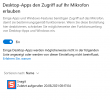
Leider kann ich damit nicht telefonieren weil immer wieder die Meldung "Could not start audio source" bei jedem Anruf auftritt.
Die Audio-Einstellungen habe ich kontrolliert und es sind die gleichen Einstellungen, die ich auch im Browser verwende, ich verstehe das nicht.
Hat hier jemand eine Idee warum es zu der Meldung kommt und anscheinend der Browser auf Audio-Geräte zugreifen kann aber die 3CX Desktop-App nicht?
Vielen Dank.
Leider kann ich damit nicht telefonieren weil immer wieder die Meldung "Could not start audio source" bei jedem Anruf auftritt.
Die Audio-Einstellungen habe ich kontrolliert und es sind die gleichen Einstellungen, die ich auch im Browser verwende, ich verstehe das nicht.
Hat hier jemand eine Idee warum es zu der Meldung kommt und anscheinend der Browser auf Audio-Geräte zugreifen kann aber die 3CX Desktop-App nicht?
Vielen Dank.