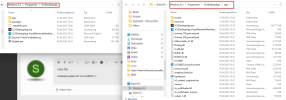
Automatische Updates der App scheinen dann nicht mehr zu gehen. Man darf dann wieder manuell updaten.Ich arbeite mit den MSI-Parametern "/qn ALLUSERS=1" für install und uninstall.
Der User sollte im Anschluss neu starten oder die Software beenden (da die Installation ja nicht mit dem betroffenen Benutzer durchgeführt wurde)
Die Provisionierung ist dann allerdings ein manueller Schritt. Dieser kann aber der Benutzer berechtigungstechnisch alleine ausführen.


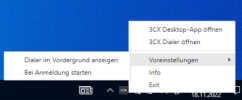
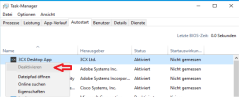
Eventuell gar nicht. Der (einzige) Starteintrag steht unter HKLM\SOFTWARE\Microsoft\Windows\CurrentVersion\Run für alle Benutzer des System. Da kommt ein Benutzer ohne entspr. Berechtigungen nicht heran.Jetzt stellt sich mir die Frage, wie ich dem User die Möglichkeit geben kann den 3CX Desktop Client (optional) aus dem Autostart herauszunehmen?
namespace _3CX_Prov
{
class Program
{
private static readonly Dictionary<string, string> PhoneProvisioning
= new Dictionary<string, string>
{
{ "503", "HTTPS://QRCODELINK503" },
{ "504", "HTTPS://QRCODELINK504" },
{ "505", "HTTPS://QRCODELINK505" }
};
static void Main(string[] args)
{
#if !DEBUG
string username = Environment.UserName;
#endif
#if DEBUG
string username = "max.mustermann";
#endif
try
{
DirectoryEntry myLdapConnection = createDirectoryEntry();
DirectorySearcher search = new DirectorySearcher(myLdapConnection);
search.Filter = "(sAMAccountName=" + username + ")";
// create results objects from search object
SearchResult result = search.FindOne();
if (result != null)
{
DirectoryEntry user = result.GetDirectoryEntry();
string pager = user.Properties["ipPhone"].Value?.ToString();
if (pager != null)
{
Console.WriteLine(pager);
string PhoneUrl = GetPhoneLink(pager);
Process.Start(@"C:\Program Files (x86)\3CX\3CXDesktopApp.exe tcx+app:" + PhoneUrl);
}
else
{
Console.WriteLine("no ipPhone");
}
}
else
{
Console.WriteLine("User not found!");
}
}
catch (Exception e)
{
Console.WriteLine("Exception caught:\n\n" + e.ToString());
}
}
static string GetPhoneLink(string key)
{
string returnValue;
if (!PhoneProvisioning.TryGetValue(key, out returnValue))
{
returnValue = string.Empty;
}
return returnValue;
}
static DirectoryEntry createDirectoryEntry()
{
// create and return new LDAP connection with desired settings
DirectoryEntry ldapConnection = new DirectoryEntry("LDAP://RootDSE")
{
Path = "LDAP://<DEIN OU PFAD ZU DEN BENUTZERN>",
AuthenticationType = AuthenticationTypes.Secure
};
return ldapConnection;
}
}
}
if (result != null)
{
DirectoryEntry user = result.GetDirectoryEntry();
string pager = user.Properties["ipPhone"].Value?.ToString();
if (pager != null)
{
Console.WriteLine(pager);
string PhoneUrl = GetPhoneLink(pager);
string DesktopApp = string.Empty;
string DesktopApp32bit = @"C:\Program Files (x86)\3CX\3CXDesktopApp.exe";
string DesktopApp64bit = @"C:\Program Files\3CX\3CXDesktopApp.exe";
if (File.Exists(DesktopApp32bit))
{
DesktopApp = DesktopApp32bit;
}
else if (File.Exists(DesktopApp64bit))
{
DesktopApp = DesktopApp64bit;
}
ProcessStartInfo AppProvision = new ProcessStartInfo
{
FileName = Path.GetFileName(DesktopApp),
WorkingDirectory = Path.GetDirectoryName(DesktopApp),
Arguments = " \"tcx+app: " + PhoneUrl + "\""
};
Process.Start(AppProvision);
}
else
{
Console.WriteLine("no ipPhone");
}
}
else
{
Console.WriteLine("User not found!");
}
}
catch (Exception e)
{
Console.WriteLine("Exception caught:\n\n" + e.ToString());
}
}

2005 gegründet, als VoIP noch eine aufstrebende Technologie war, hat sich 3CX seither zu einem globalen Marktführer im Bereich der Geschäftskommunikation entwickelt.