Follow along with the video below to see how to install our site as a web app on your home screen.
Anmerkung: This feature may not be available in some browsers.
Du verwendest einen veralteten Browser. Es ist möglich, dass diese oder andere Websites nicht korrekt angezeigt werden. Du solltest ein Upgrade durchführen oder ein alternativer Browser verwenden.
Hallo zusammen,
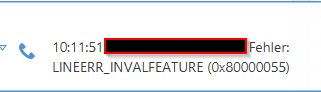
ich habe in der ERP Anwendung pds das Problem das ich bei eingehenden Anrufen, beim Annehmen in der ERP Anwendung folgende Meldung erhalte:
TAPI LINEERR_INVALFEATURE (0x8000055)
Ich kann den Anruf nicht annehmen. Bei aus der ERP Anwendung gewählten Rufen, kann ich auflegen. Es klappt also nur das Annehmen nicht.
Es wird eine lokale Instanz V20 mit V20 Client verwenden sowie aktueller TAPI Treiber.
Der Fehler tritt aber ebi allen Kunden auf. Auch mit V18 Client sowie Cloud Anlage.
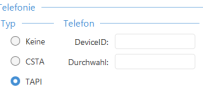
Ich kann in der ERP Anwendung noch folgende Felder befüllen:
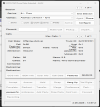
Nicht wundern, ich bin ein Arbeitskollege vom Daniel. Hier noch die Funktionen vom Tapi Capatibilities:
3CX Multiline TAPI Service Provider
51 : Timo
DeviceID: 0
General Line Capabilities
PermanentLineID: 0x00000000
PermanentLine GUID: {00000000-0000-0000-0000-000000000000}
API Version 0x00010003 to 0x00020002
[+]Calls are dropped when closing the line
[+]Answering a call has no effect on existing calls
[+]Maximum Number of active calls: 1
Addressmodes
AddressID (Index)
Supported Mediamodes
Normal human interactive voice
Video
Supported Bearermodes
Voice transmission
Digit and Tone generation and monitoring
Generate DTMF Tones
Supported Device Classes
None specified
Supported Line Features
Outgoing calls (MakeCall) is supported
Make Call Capabilities
General
Maximum Number of active calls: 1
[+]Addressmode: AddressID (Index) Supported
[-]Addressmode: Dialable Address (Digits) Supported
[-]Dial billing supported ($ in dialed number)
[-]Wait for dial tone supported (W in dialed number)
[-]Wait for quiet answer supported (@ in dialed number)
[-]Dialing multiple addresses at once (inverse multiplexing) supported
Address '0'
[-]The network by default blocks caller ID information when making a call on this address.
[-]The default setting for sending or blocking of caller ID information can be overridden.
[+]The called party's phone can automatically be forced offhook when making calls.
[+]A destination address can be dialed on this address for making a call.
[-]PBX no external calls allowed
[-]PBX no internal calls allowed
[-]This address does not support public switched telephone network address translation.
[+]The originating party's phone can automatically be taken offhook when making calls.
[-]Partial dialing is available.
[-]CallingPartyID member in LINECALLPARAMS supported
[-]Calls on this address can be made secure at call-setup time.
[+]Dial the destination number for the call (lineDial) is supported
[+]Outgoing calls (lineMakeCall) is supported
Conference Capabilities
General
[-]Calls on different addresses can be conferenced
Address '0'
Max number of calls in a conference: 0
Max number of calls in a conference (completed transfer) : 0
[+]lineDrop on a conference call parent does not drop the other parties involved in the conference call
[-]A hard-held call can be conferenced to.
[-]An entirely new call can be established for use as a consultation call (to add) on conference.
[-]Setting up a conference call starts out with no initial call.
[-]Add the call to the current conference (lineAddToConference).
[-]Prepare the call for addition to a conference (linePrepareAddToConference).
[-]Remove the call from the conference (lineRemoveFromConference).
[-]Set up a conference (lineSetupConference).
[-]Consultation can be completed as conference.
Parties cannot be removed from the conference call
Forwarding Capabilities
General
[-]Forwarding of all addresses supported
[-]Forwarding can be used as a Do Not Disturb
[-]Forwarding to other numbers is supported
Address '0'
Max number of entries in forward list: 0
Max number of specific forwarding rules allowed: 0
Minimum rings before forward: 0
Maximum rings before forward: 0
[-]Call forwarding for busy and for no answer can use different forwarding addresses.
[-]Call forwarding involves the establishment of a consultation call.
[-]Internal and external calls can be forwarded to different forwarding addresses.
[-]The number of rings for a no-answer can be specified when forwarding calls on no answer.
[-]The forwarding status in the LINEADDRESSSTATUS structure for this address is always valid and correct.
Extended Capabilities
ExtensionID: 00000000:00000000:00000000:00000000
Extended API Version (max.) 00020002
[-]Device-specific operations supported
[-]Device-specific features supported
Details for Address '0'
General Capabilities and Features
Capabilities
[+]The called party's phone can automatically be forced offhook when making calls.
[+]A destination address can be dialed on this address for making a call.
[+]The originating party's phone can automatically be taken offhook when making calls.
Call Features
[+]Accept the call (lineAccept).
[+]Answer the call (lineAnswer).
[+]Dial the destination number for the call (lineDial).
[+]Drop the call (lineDrop).
Call Information Messages
[+]The CallData member in LINECALLINFO has been updated.
[+]The number of monitors field in the call-information record has changed.
[+]The number of owner field in the call-information record was decreased.
[+]The number of owner field in the call-information record was increased.
[+]The reason field of the call-information record.
Caller ID Support
[+]Caller ID Address
[+]Caller ID unknown
[+]Called ID Address
[+]Called ID unknown
[+]Redirection ID Address
[+]Redirection ID unknown
Call States Supported
[+]Accepted
[+]Busy
[+]Connected
[+]Dialing
[+]Disconnected (remote)
[+]Idle
[+]Offering
[+]Proceeding (proceeding through the switch after dialling)
[+]Ringback (Remote station ringing)
[+]Unknown
Parties cannot be removed from the conference call
Number of Calls
Max number active calls : 1
Max number on hold calls: 0
Max number on hold pending calls: 0
Max number of calls in a conference: 0
Max number of calls in a conference (completed transfer) : 0