- Mitglied seit
- 2. September 2019
- Beiträge
- 233
Hallo!
Hat jemand schon Erfahrung mi der Mini Multizelle?
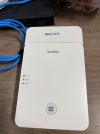
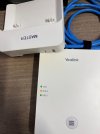
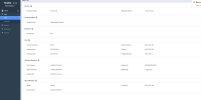
Wir haben folgendes Problem, die Master Station zeigt zwar als Rolle an (Role LED leuchtet Orange, LAN grün und DECT grün), dass sie der Master ist, aber die Software sieht so aus als ob sie eine Basis wäre. Mehrfacher Reset und auch der vorgeschlagene Weg von Yealink bis dato erfolglos.
Dear Customer,
The issue you are describing may be caused by the W75DM being in the incorrect operating mode. The device can operate in either a standard DM mode or a DM-VIM mode, which is used for integration with a Virtual Integrator Manager (VIM).
To switch the device back to the standard DM mode, please follow these steps:
Source: Phone-DECT Phone-W75DM / W75B-Deployment-VIM Deployment (Old)
Best regards,
Yealink AI Assistant
Kennt das Problem irgendwer?
LG
Elisabeth
Hat jemand schon Erfahrung mi der Mini Multizelle?
Wir haben folgendes Problem, die Master Station zeigt zwar als Rolle an (Role LED leuchtet Orange, LAN grün und DECT grün), dass sie der Master ist, aber die Software sieht so aus als ob sie eine Basis wäre. Mehrfacher Reset und auch der vorgeschlagene Weg von Yealink bis dato erfolglos.
Dear Customer,
The issue you are describing may be caused by the W75DM being in the incorrect operating mode. The device can operate in either a standard DM mode or a DM-VIM mode, which is used for integration with a Virtual Integrator Manager (VIM).
To switch the device back to the standard DM mode, please follow these steps:
- Enter Mode Switching Status: Press and hold the device key on the DM for 5 seconds. The three LEDs (LAN: green, ROLE: orange, DECT: green) will start to flash slowly.
- Confirm the Switch: Within 4 seconds of the LEDs flashing, press the device key again. The DM will then reboot.
Source: Phone-DECT Phone-W75DM / W75B-Deployment-VIM Deployment (Old)
Best regards,
Yealink AI Assistant
Kennt das Problem irgendwer?
LG
Elisabeth

 Yealink hat mich erleuchtet.